
Medical Calculators in DynamedPlus

DynamedPlus is a point-of-care reference tool. It is available for UHNM staff via their NHS Athens username.

DynamedPlus includes a range of medical calculators and decision tools. Calculators may appear in related search results and attached to topic pages. However you can also browse through the available range either via checking the A-Z list or via category.

To browse the calculators select the option at the top of the screen (no. 5 below)

Screen-shot of the DynamedPlus home page

You can then browse through the available calculators by the A-Z list or via a category.
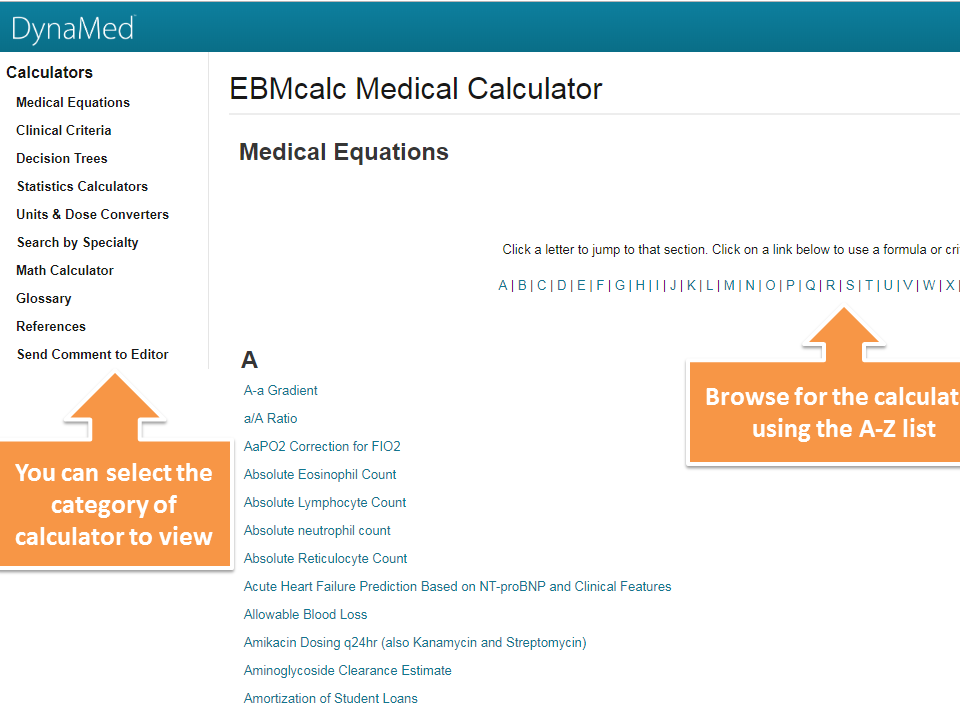
Screen-shot of the Calculators list

You can find more help about using calculators on the ebsco DynamedPlus help page.

Comments

Popular posts from this blog

Login to Library Search – step-by-step instructions for NHS staff

  Library Search is a discovery tool, allowing you to find items within the library collections. You can search Library Search without logging in to view books and ebooks available in our collections. By logging in to your library account on Library Search you can access a range of additional functionality, such as: Viewing details of your library account Submitting a request to hold a book for you Adding items to your e-bookshelf Saving searches Note that for NHS users logging in to Library Search does not give you access to full-text items. As an NHS member of staff you access online resources using your NHS OpenAthens username. Anatomy of a Library Card First let’s take a quick look at the most important components of your library card. Your library card and library card number give you access to print resources as well as library services. They confirm that you are a member of the library. Your name : this will be printed on your card, so you’ll know it’s yours!...

Which resources can NHS staff access?

 Need access to journals and articles? Want guidelines or recommended practice?  Are you looking for case reports or drug reference texts? Want to be confident of the clinical decisions you make? Complete our short tutorial Finding NHS Resources to quickly learn about the wealth of material that you can access. You'll learn: Which essential resources you can use How to access NHS resources How you can learn more about NHS resources Contact the Health Library for more help finding the information you need.

How to find a Keele eJournal on Library Search?

Library Search includes an A-Z list of the ejournal collection available at Keele University. Note that NHS-subscribed ejournals are not available via the Library Search interface. There are a number of different ways to look for Keele ejournals on Library Search. This blog post will just give you one simple route. 1. Start at the Library Search home page. Click the more option on the top menu bar – this is represented by the 3 dots The top menu bar includes the more option represented by 3 dots 2. Select the Keele eJournals A-Z option. A range of extra options are presented - choose Keele eJournals A-Z 3. Keele eJournals A-Z search interface. You are then presented with the Keele eJournals A-Z search interface, You can either browse through the titles available alphabetically or enter your journal title into the search box and click search. Screen-shot of the Journal search interface, including an alphabetic list In this example I have en...